

Beginner's guide
How to play Packet Empire
Everything you need for your first hour: how packets flow, what each machine does, how clients pay, and how to keep the place from melting.
Checked against the current build: 27 November 2026
The goal
Packet Empire is a factory game about running the internet. You place machines on a grid, wire them together with cables, and glowing data packets flow through them. Clients pay for every packet they want as it arrives, plus a bonus for finishing their contract in time. You spend the money on more machines, faster cables, research and more of the building, and grow from one Uplink in the only lit room of a bankrupt data centre to a floor that hums.
There's no combat and nothing is ever destroyed. The challenge is throughput: getting the right packets to the right clients, fast enough, without running out of power or overheating.
Your first line
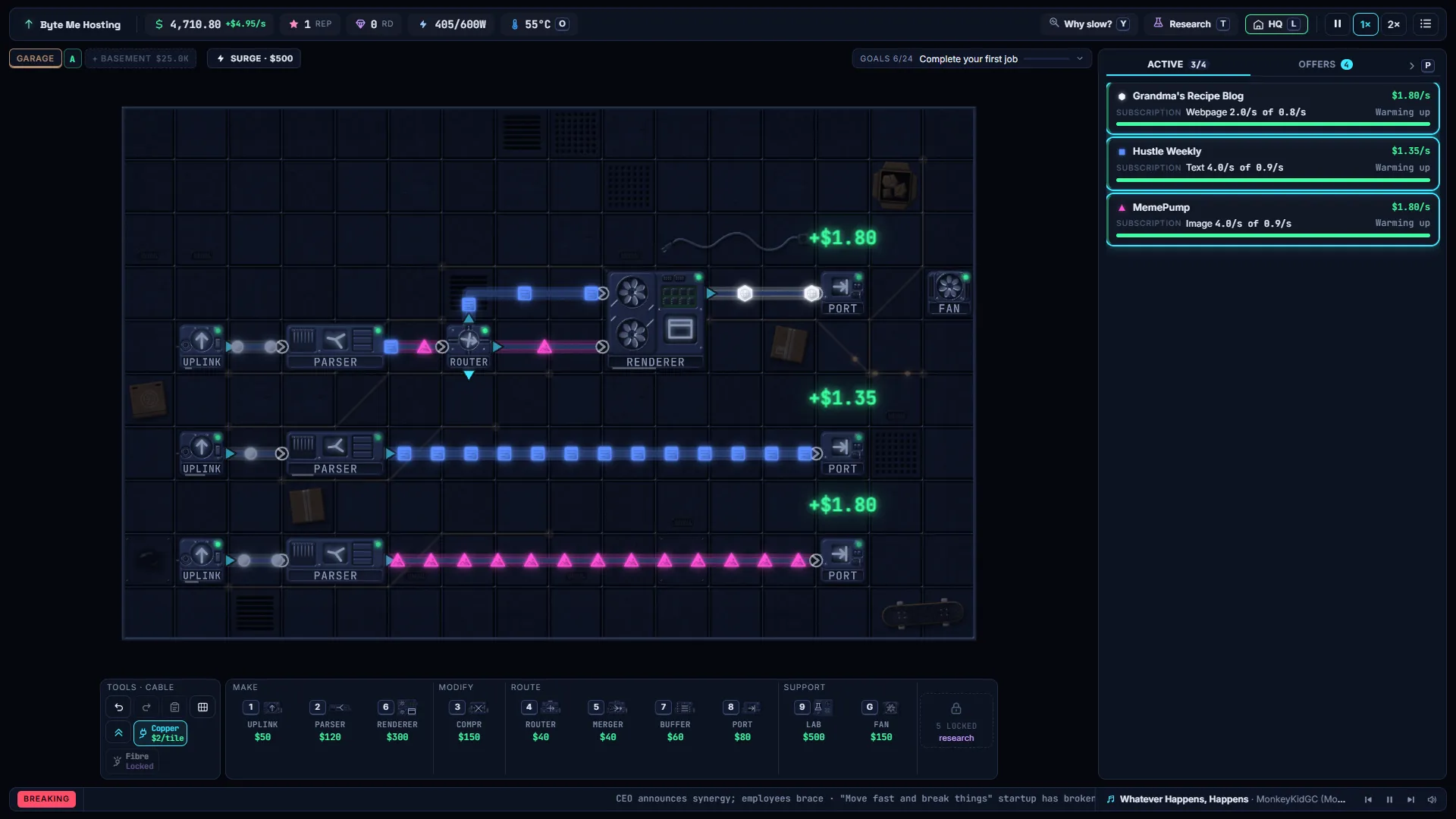
A new game opens in the one room of the building with the lights on, on your cousin's half-built line: an Uplink feeding a Parser, already humming. The Parser is set to Image, but your cousin's client wants Text, and its output goes nowhere, so packets pile up. The tutorial walks you through fixing it:
- Set the Parser to Text. Click the Parser and pick Text.
- Place a Delivery Port to the right of the Parser.
- Drag a cable from the Parser's output to the Port's input. The queued packets rush out.
- Get paid. Every Text packet pays as it lands, and when all 30 have arrived the contract is done.
- Accept a new client from the offers, and build their line yourself, starting with an Uplink.
That's the whole game in miniature: source → transform → deliver. Everything after this is longer lines, more packet types and more clients at once.
Packets
Every packet type has its own colour and its own shape, so a busy floor stays readable (there's a colour-blind palette too). These are the types you'll use in the game today:
| Packet | How you make it |
|---|---|
| Raw | Pours out of every Uplink. Some clients (DataHoarders Inc.) will even buy it as it is. |
| Text | A Parser set to Text turns Raw into Text. |
| Image | The same Parser set to Image (or Alternate, for both). |
| Webpage | A Renderer combines one Text and one Image into a Webpage. |
| Hash | A Hasher turns Raw into Hashes. Slow and power-hungry. Needs Proof of Work research. |
Packets can also carry tags: Compressed (a Compressor), Encrypted (an Encryptor) and Validated (a Firewall). Clients who ask for a tag pay more for it. During a DDoS, Malicious packets turn up too, and only a Firewall gets rid of them. Video, Query, Game Session, AI Inference and Model Weights packets are planned, with their machines, for the full release.
Every machine
There are 15 machines, and most can be upgraded to Mk II and Mk III (faster, but hotter and hungrier). Some are unlocked by research:
| Machine | What it does | Unlock |
|---|---|---|
| Uplink | Makes Raw packets, about four a second. Every line starts here. | Start |
| Parser | Raw in, Text or Image out. Its setting is right on the machine. | Start |
| Router | Splits traffic across its outputs. Each output can filter: Any, a packet type, or exact tags (plain Text, Compressed Text and so on). | Start |
| Merger | Three inputs, one output. Tidies busy lines. | Start |
| Renderer | One Text + one Image make a Webpage. | Start |
| Compressor | Adds the Compressed tag: worth more to the clients who want it. | Start |
| Buffer | A 16-packet queue that smooths out bursts. | Start |
| Delivery Port | Where packets leave the floor and clients pay. Takes packets on all four sides, and Auto hands each one to the contract that needs it most. | Start |
| Research Lab | Eats packets and turns them into Research Data. | Start |
| Desk Fan | Cools every machine within two tiles. | Start |
| Hasher | Raw in, Hash out. Hot and hungry. | Proof of Work |
| Encryptor | Adds the Encrypted tag (Totally Legit Bank insists). | Encryption |
| Firewall | Deletes malicious packets during a DDoS and marks the rest Validated. | Network Security |
| Chiller | Big 2×2 cooler with a three-tile reach. | Industrial Cooling |
| Shipping Dock | Ships packets to a megaproject. | Logistics |
Removing a machine refunds its full price, so moving things around is free. Experiment.
Contracts and clients
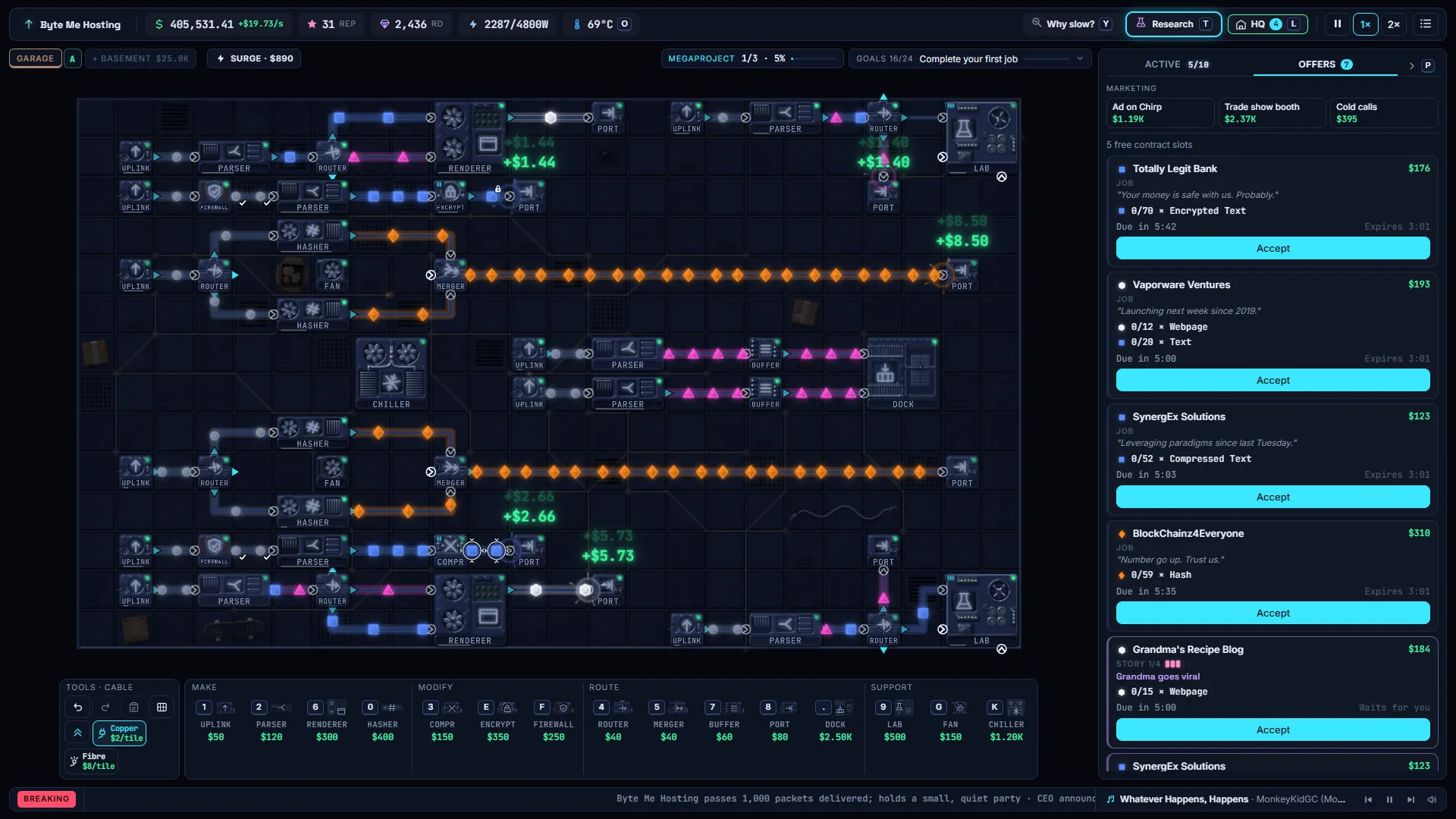
Money comes from contracts with fictional clients. Every client has its own ladder of hand-written contracts: finish one and, a little later, they come back with the next, bigger and harder one. There are 17 clients and 90 contracts in all.
- Stages. A contract is a finite order in up to four stages, with one deadline for the whole thing. A stage asks you to deliver a number of packets (one type or several, any Port, any order), to fill an exact mix such as 3 Webpages to 1 Text in sets at one Port, or to go live: hold a rate for a while on an SLA meter. If the meter runs out, the hold starts again.
- Pay as you deliver. Every packet pays as it arrives, and finishing in time adds a bonus. Miss the deadline and you keep what you were paid, but the bonus is lost and the client comes back later to try again.
- Traits. Some contracts add a twist. Fragile packets must reach the Port within 5 seconds of their last machine. Picky clients refuse Compressed packets unless they asked for them. Bulk orders are huge and cheaper per packet, with more time, and Overnight ones are enormous, with a very long deadline.
The Offers tab shows each client's next step, one or two repeat orders ("The usual": more of something you already make, for a little less) and the odd rush job when an event stirs up the market. Your floor can run a limited number of contracts at once, and Sales Team research raises the limit. Priority Accounts and then Enterprise Sales open the later chapters of every ladder: bigger orders, better pay. Delivery Ports take packets on all four sides and are on Auto by default, handing each packet to whichever contract needs it most (a rate hold that's falling behind first, then the nearest deadline). You can pin a Port to one contract if you'd rather.
Power
Every machine draws power, whether it's busy or not, and the building has a power plan with a capacity in watts, from 300 W up to 19,200 W. If demand goes over capacity, there's a brown-out: every machine on the floor slows down to match. The power chip in the top bar turns yellow when that happens. The fix is the next power plan up, which costs money once.
Heat and cooling
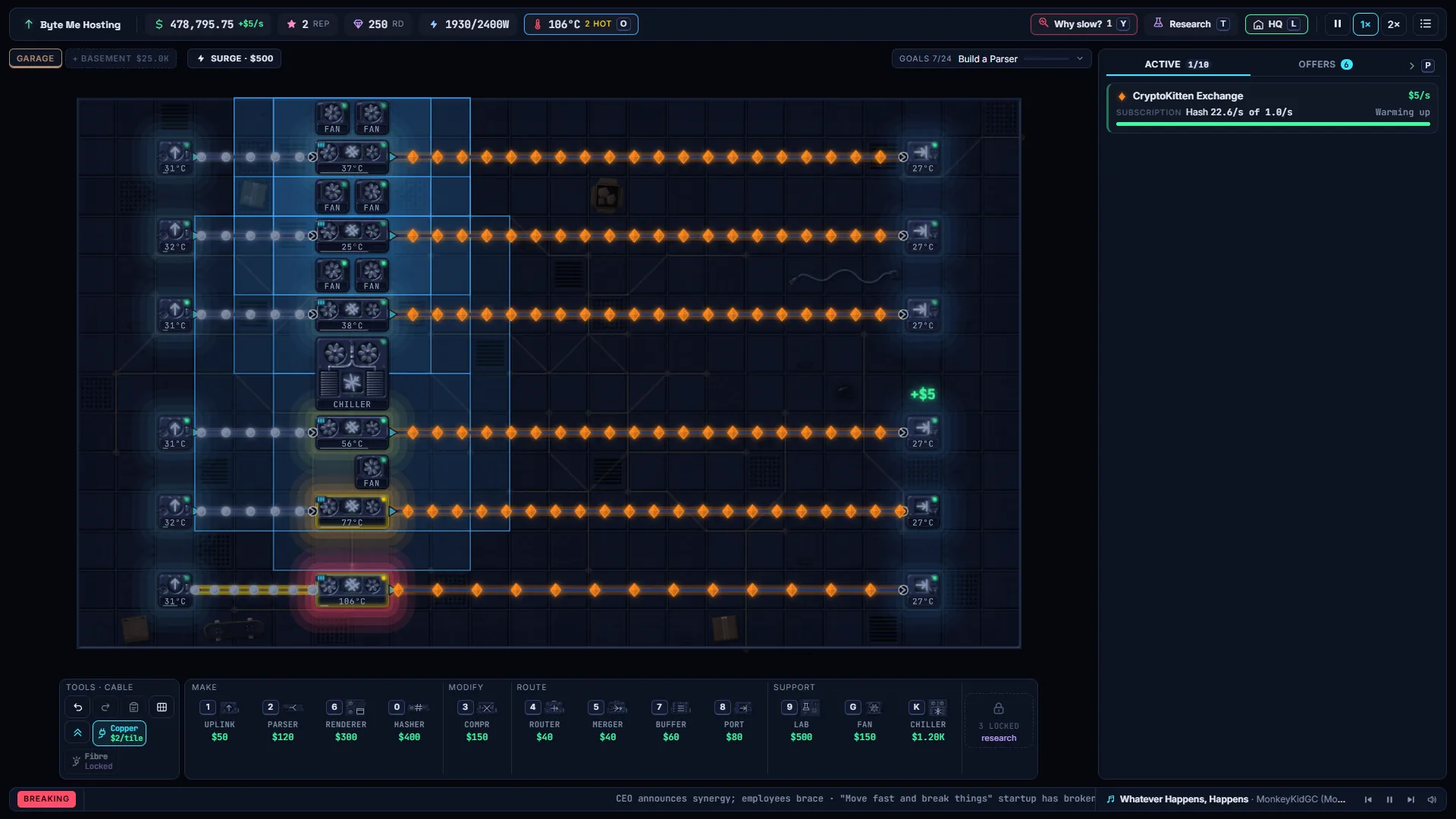
Machines get hot, and they heat their neighbours. Packing them tight or upgrading them to Mk III makes them hotter. Turn on the heat overlay (the heat chip in the top bar) to see every temperature.
- Above 70 °C a machine throttles: it slows down, down to half speed at 90 °C.
- At 90 °C and above it can break down. A broken machine stops but keeps its packets, and a repair is one click (it costs a fraction of the machine's price). Nothing is ever destroyed. On Relaxed difficulty, machines never break at all.
- Cooling: a Desk Fan cools everything within two tiles. A Chiller (Industrial Cooling research) cools far more within three. Coolers never overheat themselves.
Research
Feed packets into a Research Lab and it produces Research Data (fancier packets are worth more). Spend it in the research tree, which has 24 nodes across networking, hardware, business, security, crypto, infrastructure and automation, plus endless R&D tracks later. Some favourites:
- Fibre Optics: much faster cables.
- Overclocking I and II: Mk II and Mk III machine upgrades.
- Sales Team I to III, Priority Accounts, Enterprise Sales: more contract slots, and the Priority and Enterprise chapters of every client's ladder.
- Proof of Work, Encryption, Network Security: the Hasher, Encryptor and Firewall.
- Cold Aisle Containment, Low-Voltage Racks: machines make 20% less heat and draw 10% less power.
- Maintenance Bots, Account Managers, Renewal Desk: late-game automation that repairs machines, takes repeat orders your lines already make, and brings finished clients back sooner.
Market events
Every so often the market does something. Nine events can happen, and the first ones in a new game are always the good kind. A few examples:
- DDoS: your Uplinks spit out malicious packets. Firewalls in the right places keep your ports from choking.
- Crypto Boom: Hashes are suddenly worth triple.
- Viral Meme: everyone wants Images, right now.
- Power Surge and The Intern: a few machines trip or get unplugged. They come back on their own, or with a free click.
The news ticker at the top of the screen announces events, and pokes fun at the tech industry in between.
Powering up the building
Your cousin bought the whole building at auction, sight unseen: the old data centre of Hyperbloat 2000, a dot-com that raised $400M and spent it on beanbags. It's 40×40 tiles, and the power company only switched on one room, the lit 10×10 room in the middle where you start. The rest is dark, dusty and full of Hyperbloat's junk, and nothing can be built there until you power it up.
- The building is split into 5×5 sections in three rings around the lit room: 12 sections in the first ring, 20 in the second and 28 in the third.
- You can buy any section that touches your land on a side. You don't have to finish a ring first.
- The further out, the dearer: $7,500 a section in the first ring, $30,000 in the second and $100,000 in the third (25% less on Relaxed, 50% more on Hard).
- A padlock marks every section you can buy, with its price underneath. Click it (or the Land chip under the top bar) and press Power up: a light sweeps across, the tiles switch on and the junk is cleared. Nothing you've built moves, so your floor simply gets bigger.
Later come the megaprojects: a billboard the size of a building, a private undersea cable and a satellite. You fund each stage, ship it packets through Shipping Docks, and keep its bonus forever. More of the building (rings beyond the first three), new machine tiers and a proper ending are planned for the full release.
Ten beginner tips
- Read the status line. Every machine says what is wrong in plain words ("Waiting for Image", "Output blocked"). Click it before you guess.
- Watch the floor grade. Your floor has an A to F grade. It tells you what to tinker with next.
- Check every stage before you accept. One deadline covers the whole contract, so make sure your lines can do each stage: the pile of packets, the exact mix and the rate to hold.
- Feed a Research Lab early. A spare Uplink and Parser into a Lab keeps research ticking while you build.
- Get Fibre Optics soon. Faster cables lift the limit on everything downstream.
- Leave gaps for fans. Tightly packed machines heat each other. One empty tile between hot machines helps.
- Upgrade the power plan before you need it. A brown-out slows every machine on the floor, not just the new one.
- Use Undo freely. Undo and redo cover building, moving and deleting, and removing a machine refunds it in full.
- Save good layouts as blueprints. Box-select a line you like, save it, and paste it into the next section you power up.
- Close the game whenever you like. Nothing happens while it is closed: no offline timers and nothing breaks while you are away.
Questions this didn't answer? Try the Packet Empire FAQ, ask in the Discord, or read why nothing in Packet Empire is ever destroyed. Numbers in this guide come from the current build and may change during Early Access.